← Back to Blog
How to Make AI Videos from Claude with the CraftStory MCP Server
October 8, 2026 · CraftStory Team
CraftStory now works inside Claude. Connect it once, and from then on you ask for videos in plain English: a 10-second clip where you present a product, a two-minute explainer read from a script, or your custom avatar saying three lines for Instagram. Claude picks the right model, uploads your files, waits for the render and hands you the link.
This is the full walkthrough: how to connect CraftStory in claude.ai and Claude Desktop (one connector, two minutes) and in Claude Code and other local clients, what to ask first, what it costs and what to do when something does not work. Under the hood it is our open-source MCP server (Model Context Protocol), the standard Claude uses to call outside tools.
What you can ask for
- “Turn this photo into a 10-second clip where I say ‘Welcome to our spring collection’.”
- “Make a vertical 9:16 ad: my product photo on the table, a woman presents it, calm studio sound.”
- “Use my avatar Alex and have him say the three lines below, 4:5 for Instagram.”
- “Make a 2-minute explainer from this script with the voice ‘Daniel’ and the photo attached.”
Everything is billed in the same credits as the web app, and a failed job is refunded. The videos also appear in your CraftStory library, so nothing lives only in the chat.
Before you start
You need a CraftStory account on a plan with API access (Producer, monthly or annual). That is the only requirement for claude.ai and Claude Desktop. For Claude Code and other local clients you also need an API key from the app (Account → API Access → Create key; keys look like
sk-cs-…) and Node.js 20 or newer on your computer.
Setup in claude.ai and Claude Desktop (2 minutes)
Connectors belong to your Claude account: add CraftStory once in claude.ai, and it shows up in Claude Desktop and the mobile apps too (and the other way round).
- Open Settings → Connectors → Add custom connector.
- Fill in the connector. Name:
CraftStory. URL:https://mcp.craftstory.com/mcp. Open the advanced settings and set OAuth Client ID tohAlwpyaDeO0CmuEKMibZxiXxtTT09NXL; leave the client secret empty. The client ID is public, it only tells CraftStory which app is asking.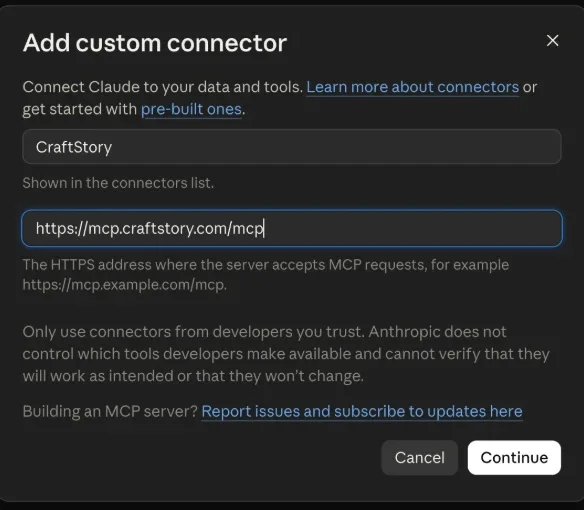
Name and URL, then Continue. 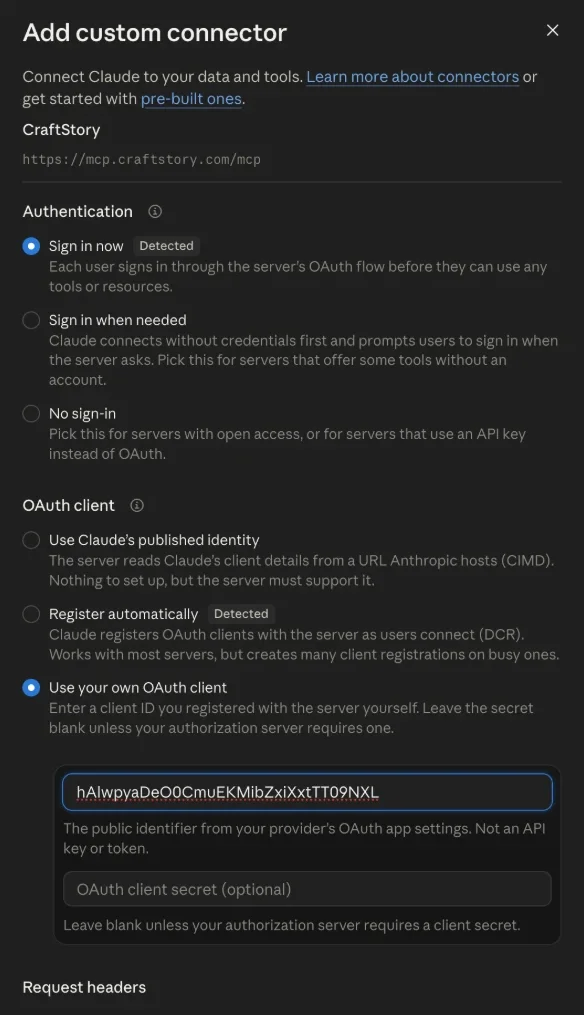
Authentication: Sign in now. OAuth client: Use your own OAuth client, paste the client ID, leave the secret empty. - Click Connect and sign in with the account you use at app.craftstory.com. If you started from Claude Desktop, the browser first asks you to confirm that you are finishing a connection you began yourself, and at the end offers to switch back to the desktop app.
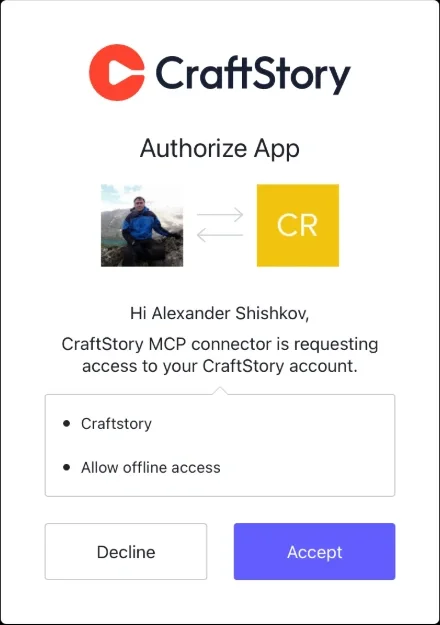
The CraftStory sign-in page asks you to allow the connector. Accept. 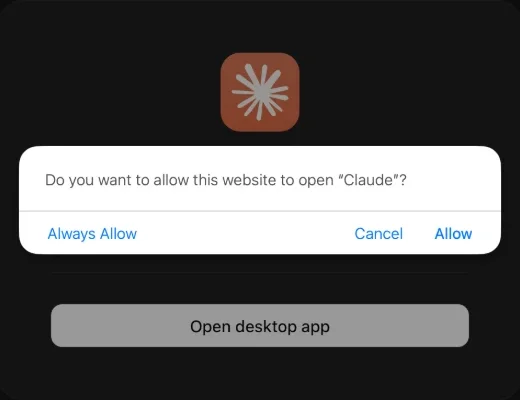
From Claude Desktop: allow the browser to open Claude to finish. - Turn the tools on in a chat. Open the tools menu in the message box and make sure CraftStory is enabled. Each tool asks for approval the first time unless you change that in the connector settings.
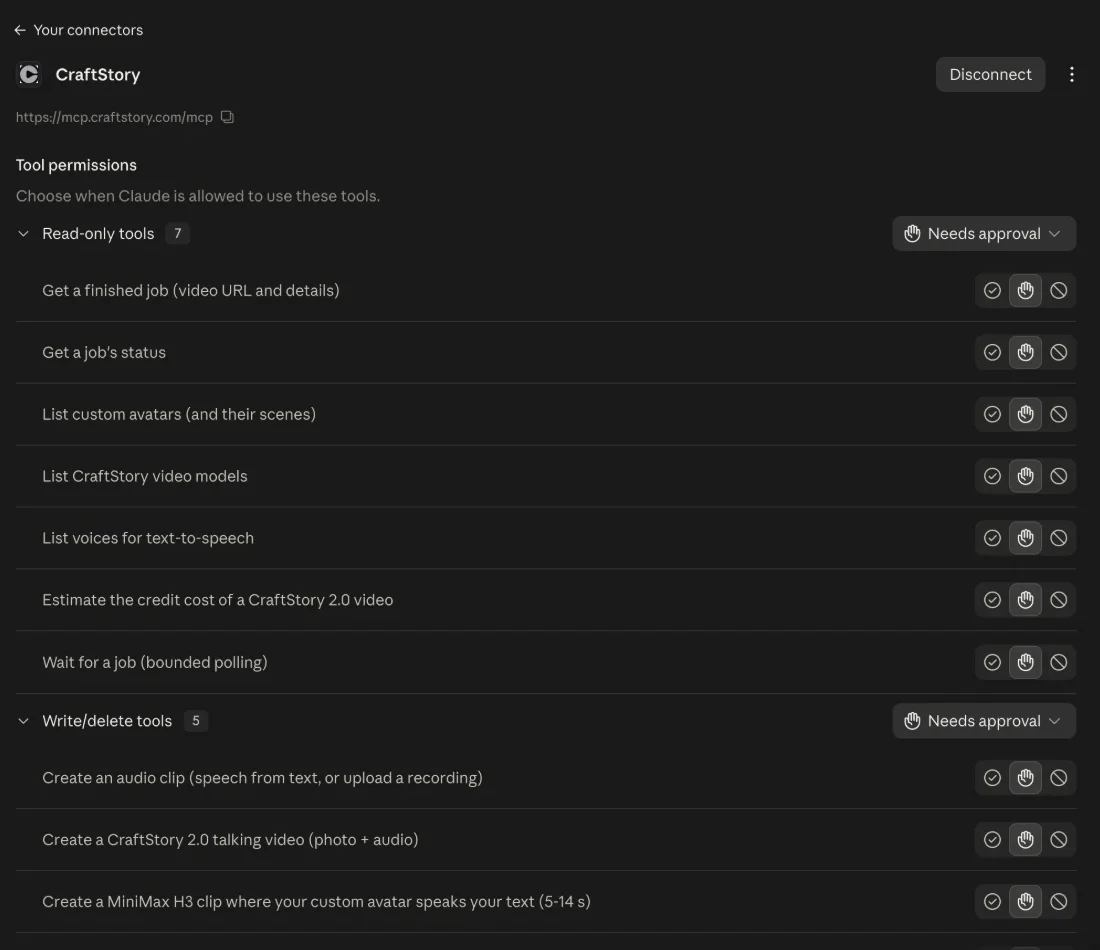
Connected: the connector page lists the 12 CraftStory tools; set per-tool approval here.
With the connector, a photo gets to CraftStory in one of two ways. Give Claude a public URL (your site, a CDN, a Drive or Dropbox share set to “anyone with the link”), or just say you want to use a photo from your phone or computer: Claude asks CraftStory for a one-time upload link, you open it (on the phone too), drop the photo, say “uploaded”, and Claude continues. The link lives 15 minutes and takes one JPG, PNG or HEIC up to 20 MB. Files attached to the chat itself do not reach the connector, and local paths (
~/Photos/me.jpg) work only with the local server below. Custom connectors are available on Claude Pro, Max, Team and Enterprise plans. CraftStory is not in the built-in connector directory, which does not list AI video generators, so it is added by URL.
Setup in Claude Code (1 minute)
Claude Code runs the same server locally from npm with your API key. One command, then
claude mcp list to confirm it is connected:
claude mcp add --scope user craftstory -e CRAFTSTORY_API_KEY=sk-cs-paste-your-key-here -- npx -y @craftstory/mcp--scope user makes it available in every project. The local server can also upload files straight from your disk, so paths like ~/Photos/me.jpg work here.
Cursor, Windsurf, Zed and other local MCP clients
Any client that starts MCP servers itself takes the same package in its config file (for Cursor that is
~/.cursor/mcp.json). This block also works in Claude Desktop’s claude_desktop_config.json (Settings → Developer → Edit Config) if you prefer the local server there, for example to pass local file paths:
{
  "mcpServers": {
    "craftstory": {
      "command": "npx",
      "args": ["-y", "@craftstory/mcp"],
      "env": { "CRAFTSTORY_API_KEY": "sk-cs-paste-your-key-here" }
    }
  }
}
Your first video: a 5-second clip from a photo
Ask Claude:
Make a 5-second video from a photo on my phone: I smile and say “Hi, I’m Alex, welcome to CraftStory.”
What happens:
- Claude calls
list_modelsto see what is available and what it costs. - It calls
request_file_uploadand sends you a link; you open it, drop the photo and say “uploaded”. (With a public URL, or with the local server, this step is skipped.) - It starts a MiniMax H3 job with the photo and your line in the description.
- It polls the job with
wait_for_job; a 5-second clip takes about 2–4 minutes. - You get a link to the MP4 (valid for 7 days; the video also appears in your CraftStory library).
Cost: 4.2 credits per second, so a 5-second clip is 21 credits. Claude tells you the price before it starts.
The three ways to make a video
1. A short clip with generated sound (MiniMax H3, up to 15 s). Best for product shots, social clips and quick talking heads. One photo in; the model animates it, voices the lines you write in quotes and adds ambient sound.
A 10-second clip of the jacket photo at this link: a woman holds the jacket up to the camera and says “This is the one I wear every day.” Street café background, soft daylight.
- Put the spoken words in quotes; everything else is scene direction.
- Add up to three extra files to keep things consistent: a product photo, a logo, a colleague’s portrait, a music bed. Tell Claude what each file is: “the second file is our logo, keep it on the cup”.
- Pick a shape: “make it 9:16” (vertical), 16:9, 1:1, or 4:5 for Instagram ads. Leaving it out follows the photo.
2. A long talking video from a script (CraftStory 2.0). Best for explainers, courses and onboarding, anything longer than 15 seconds, up to 30 minutes from one photo.
Make a talking video of my photo reading this script with the voice “Daniel”, 720p vertical: [script]
Claude lists the voices, turns your script into speech with
create_audio_clip, shows the cost with preview_cost, starts the CraftStory 2.0 job and polls until it is done. A one-minute video renders in 8–15 minutes; Claude keeps checking and reports when it is ready. Your own recording works too (“use the attached audio”), as do voices cloned in the app. Gestures: calm or expressive; resolution 480p or 720p, 1080p via upscale afterwards.
3. Your custom avatar speaks (MiniMax H3 avatar mode). If you have created a custom avatar in the app (Avatars → Create avatar, about 15 seconds of you talking to the camera), it is usable from Claude within a minute of the upload.
List my avatars. → Use avatar Alex, scene 2, and have him say “Thanks for joining, let’s get started.” Make it 4:5.
The avatar’s face, voice and manner come from your clip; there is no audio to upload. 5–14 seconds per clip at 5.6 credits per second, with up to three extra photos or audio tracks as references.
Useful prompts
- “What does a 30-second 720p video cost?” →
preview_cost - “Show the status of my last job.” →
get_job_status - “Upscale that video to 1080p.” →
upscale_video(0.2 credits per second) - “Which voices sound British?” →
list_voices - “Make five variants of the same ad with different hooks: …” → Claude runs them one after another.
What to expect
| Job | Typical time | Credits |
|---|---|---|
| MiniMax H3 clip, 5–15 s | 2–4 min | 4.2 / s |
| MiniMax H3 avatar clip, 5–14 s | 10–25 min | 5.6 / s |
| CraftStory 2.0 talking video | 8–15 min per minute of video | 3.3 / s at 720p |
| Upscale | 1–3 min | 0.2 / s |
Claude’s tool calls are capped at about a minute each, so for long renders it calls
wait_for_job several times. That is normal. If the chat goes quiet, ask “is my video ready?”.
Troubleshooting
- “Won’t take a local file.” Ask Claude for an upload link (“send me a link to upload the photo”), or give it a public URL. Nothing is charged for a job that did not start.
- The upload link expired or was already used. Links live 15 minutes and take one file; ask Claude for a new one.
- The connector asks for a plan. The account you signed in with is not on a plan with API access. Upgrade to Producer at craftstory.com/pricing and reconnect.
- The connector is missing in a chat. Open the tools menu in the message box and switch CraftStory on; in Settings → Connectors it should say Connected, otherwise click Reconnect.
- The local server’s tools don’t show up. Restart the client after editing the config; check
node -v(20+); the key must start withsk-cs-. - “Low credits”. Buy a pack in the app (Account → Credits) or wait for the monthly grant; the job was not charged.
- “Photo didn’t pass moderation”. The photo was refused; credits are refunded, try another one.
- A job failed. Failed jobs are always refunded; ask Claude for the failure reason.
- Privacy. The hosted connector verifies your sign-in and forwards each request to the CraftStory API, storing nothing. The local server runs on your computer and only talks to api.craftstory.com; files you pass as paths are uploaded to your account and can be deleted there.
Frequently asked questions
Do I need to install anything to use CraftStory in claude.ai?
No. Add https://mcp.craftstory.com/mcp as a custom connector in Settings → Connectors, paste the public OAuth Client ID from craftstory.com/mcp, and sign in with your CraftStory account. The connector then works in claude.ai, Claude Desktop and the mobile apps. Claude Code and other local clients run the same server from npm with an API key.
Which CraftStory plan do I need?
A plan with API access: Producer, monthly or annual. The connector and the API key both check it. Videos are billed in the same credits as the web app, and failed jobs are refunded.
Can Claude use my own photos and recordings?
Yes. With the connector, pass a public URL or ask Claude for an upload link: it sends you a one-time page where you drop the photo (15 minutes, one file up to 20 MB), and continues once you say it is uploaded. Chat attachments themselves do not reach the connector. With the local server (Claude Code, Cursor, or Claude Desktop configured locally) you can also give a path such as ~/Photos/me.jpg.
How long does a video take?
A 5–15 second MiniMax H3 clip takes about 2–4 minutes, an avatar clip 10–25 minutes, a CraftStory 2.0 talking video 8–15 minutes per minute of video. Claude polls the job and reports when the link is ready.
Does Claude see my CraftStory password?
No. In claude.ai you sign in on CraftStory's own login page; Claude only receives a token for the connector. Locally the server uses an API key you create in the app and can revoke at any time.
Is the MCP server open source?
Yes, MIT-licensed: github.com/itseez3d/craftstory-mcp, published on npm as @craftstory/mcp.
Try it now.
Add the connector in claude.ai (URL and client ID above) or install the package from craftstory.com/mcp, then ask Claude for your first clip. Source code: github.com/itseez3d/craftstory-mcp; API reference: api.craftstory.com.