← Back to Blog
MiniMax H3 in CraftStory: 5× Faster Generation with Reference Photos, Video and Audio
September 8, 2026 · CraftStory Team
We have added MiniMax H3 to CraftStory — and spent the last two weeks making it fast. H3 is a different kind of model from our long-form Model 2.0: it makes short clips with sound from reference material, and it is very good at following exactly what you show it — a person, a product, a style frame, a motion clip, a voice.
The headline number: generation is about 5× faster than the base model with almost no quality loss. Here is what changed, what H3 can take as input, and how to use it.
How we made it 5× faster
A big part of the speed-up comes from the open-source MiniMax-H3-Acc-LoRAs by Alibaba PAI: acceleration adapters that bring sampling from 50 steps down to 8.
Measured on the same inputs, warm GPU, 10-second 768p clip:
| Path | Base model (50 steps) | Accelerated (8 steps) |
|---|---|---|
| Photo + scene description | ~16 min | ~3.5 min |
| Photo + reference video/audio | ~25 min | ~5 min |
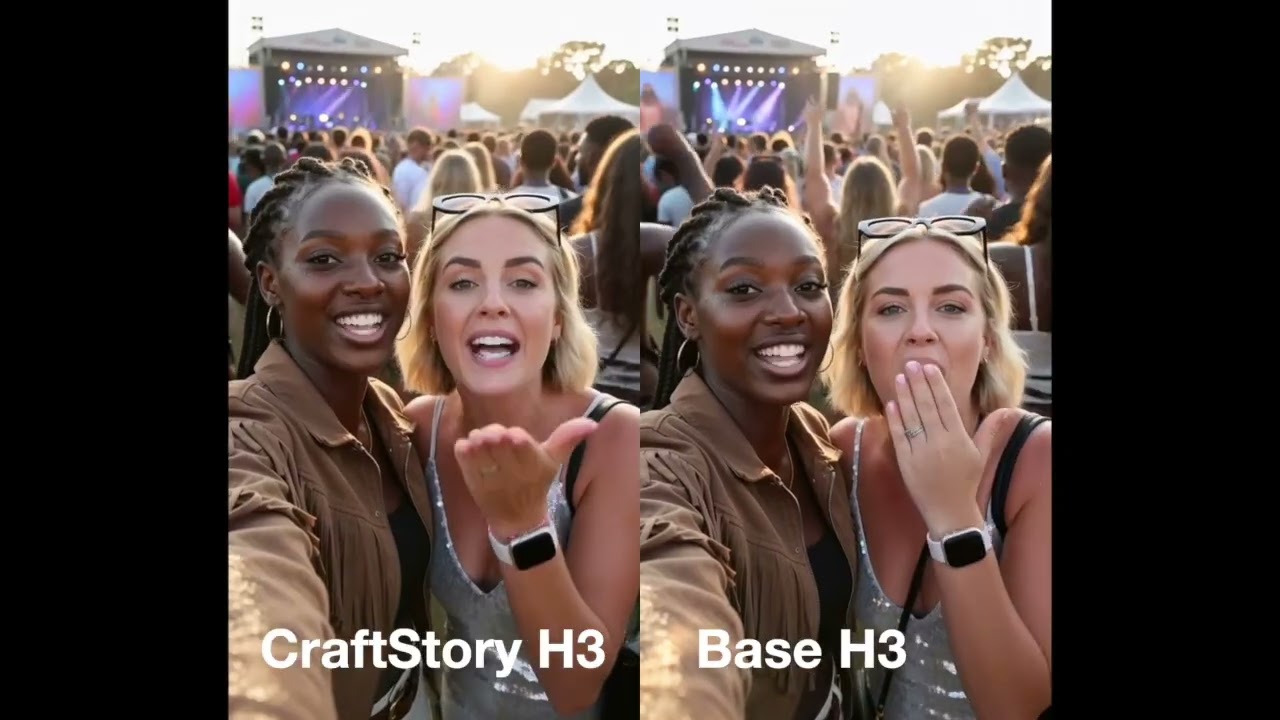
We compared the outputs frame by frame before switching. Motion, lip-sync and identity are on par; the base model occasionally keeps slightly finer texture. The video above shows both on the same audio so you can judge yourself.
What you can give the model
H3 is at its best when you need precise control over characters, products, style, motion or voice. In a single generation you can combine up to:
- 9 photos — the source photo plus 8 references: the person from another angle, the product, a style frame
- 3 reference videos (2–15 s each) — a motion or camera reference
- 3 audio clips (up to 30 s each) — the speech or music the clip should follow, a voice sample
Each reference gets a one-line caption, so the model knows what it is looking at. Clips are up to 15 seconds long. With audio, the video follows it; without audio, describe the scene (up to 4,000 characters), pick 5–15 seconds, and the model invents the soundtrack itself — including speech, if your description says who says what.
How to use MiniMax H3 in CraftStory
- Open Media to Video and pick MiniMax H3. Sign in at app.craftstory.com, open Media to Video and choose the MiniMax H3 mode.
- Upload the source photo. One clear photo of the person or product that should appear in the clip. This is Picture 1 for the model.
- Add audio or describe the scene. Upload or record audio up to 30 seconds and the video follows it — or skip audio, describe the scene in up to 4,000 characters and pick a 5–15 second duration; the model creates the soundtrack itself.
- Add references (optional). Up to 8 more photos, 3 reference videos and 2 extra audio clips: a product shot, a style frame, a motion reference, a voice sample. Add a one-line caption to each so the model knows what it is for.
- Generate, then refine. Generation takes a few minutes. Then Upscale to 2K, Enhance, or hit Edit to tweak the references and run again.
Results land in your Media to Video list with the HD (768p) badge; from there you also can upscale or enhance. Like every CraftStory video, the file carries C2PA Content Credentials.
H3 or Model 2.0?
Use H3 for short clips where the references matter: a product in someone’s hands, a specific motion, a music-driven scene, a 10-second ad with a voice you supply. Use Model 2.0 for a person talking to camera for minutes — explainers, courses, founder videos — from one photo or your custom avatar. Both live in the same account and the same credits.
Frequently asked questions
What is MiniMax H3?
MiniMax H3 is a video model that generates a short clip with sound from reference material: a source photo plus optional extra photos, video clips and audio. In CraftStory it powers the Media to Video flow — either audio-driven (your audio, the video follows it) or scene-driven (you describe the scene and pick a duration, the model invents the soundtrack).
How long can an H3 clip be?
Up to 15 seconds. With your own audio, the clip follows the audio length (capped at 15 s); without audio you pick 5–15 seconds. For talking-presenter videos of several minutes use CraftStory Model 2.0 instead.
How many references can I add?
One source photo plus up to 8 more photos (9 in total), up to 3 reference videos of 2–15 seconds each, and one main audio plus 2 more clips (3 in total, each up to 30 seconds).
Why is it 5× faster now?
Two things: Alibaba PAI's open-source MiniMax-H3-Acc-LoRAs, which cut the sampling from 50 steps to 8, and our own pipeline tuning. In our tests a 10-second clip from an image takes about 3.5 minutes instead of 16, and the reference-driven path about 5 minutes instead of 25.
Does the faster version lose quality?
Almost none in our side-by-side tests. Motion, lip-sync and identity are on par with the base model; the base model occasionally renders slightly finer texture. Watch the comparison video linked in this post and judge for yourself.
Is it available on the free plan?
Yes. H3 generations are priced per second of output in credits, and the free plan comes with starter credits, so you can try it without a card. See the pricing page for the current rate.
Can I upscale or edit the result?
Yes. H3 clips support upscale to 2K or enhance like other CraftStory videos. Outputs carry C2PA Content Credentials.
Try MiniMax H3 now.
Open CraftStory — upload a photo, add your audio or describe the scene, and get a clip with sound in minutes. See pricing for the per-second rate.